STAR Reinvest Bot — Complete Guide
STAR Reinvest (Spot Trailing And Reinvesting) is a grid-based trading bot that automatically reinvests realized profits back into the grid. It operates on spot markets without leverage, compounding gains cycle after cycle.
Unlike the standard STAR Grid Bot, STAR Reinvest feeds profits back into the grid — increasing position sizes as the bot earns. This makes it particularly suited for longer-running setups where compounding can make a meaningful difference.
Getting Started
The bot runs inside Telegram. Open @coinstream_robot and tap Open to launch the mini app.
On the Bots tab, create a new bot:
- Tap the + button
- Select STAR Reinvest — grid trading with profit reinvestment
- Pick a trading pair
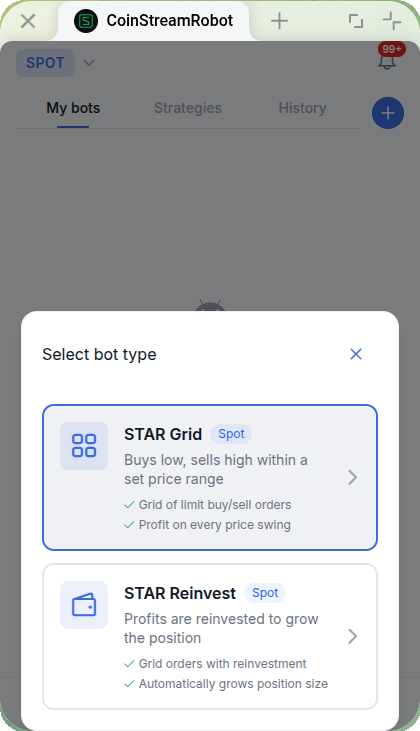
When choosing a pair, consider:
- Liquidity — popular pairs like ETH/USDT or BNB/USDT ensure reliable order execution
- Volatility — the bot needs price movement to generate profits
- Familiarity — trade assets you understand and follow
For beginners, ETH/USDT is a solid choice with good liquidity and reasonable volatility.
STAR Reinvest vs STAR Grid
Both bots share the same grid mechanics, but differ in how they handle profits:
| Feature | STAR Grid | STAR Reinvest |
|---|---|---|
| Profit handling | Accumulated separately | Reinvested into the grid |
| Position size over time | Fixed | Grows as profits compound |
| Trailing Up | Available | Available |
| Best for | Stable, predictable returns | Long-term compounding |
| Risk profile | Constant exposure | Increasing exposure over time |
Core Parameters
After selecting a pair, you'll see the configuration screen.
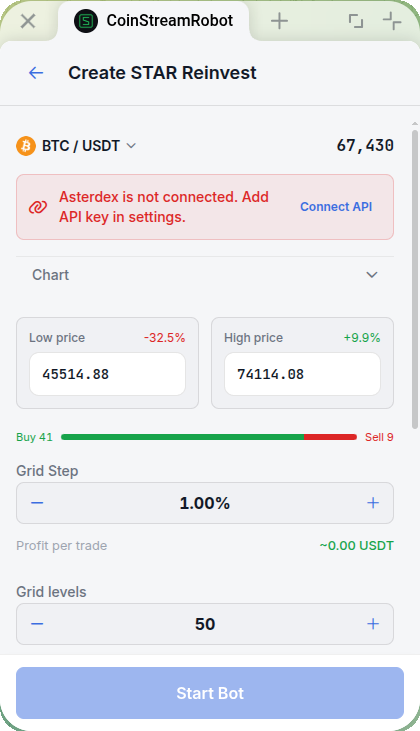
Price Range
Set a lower price (where the bot starts buying) and an upper price (where it sells everything). The chart includes visual sliders — drag them to adjust.
How to pick a range:
- Check the 30-day chart for the asset
- Find the zone where price spent most of its time
- Add 10-15% buffer below for potential dips
Common mistake: setting a range too narrow. If price breaks out, the bot stops trading and sits idle until price returns.
Grid Step
The step defines the spacing between price levels. Quick options: 0.5%, 1%, 1.5%, 2%.
The tradeoff:
- Smaller step → more trades, less profit per trade
- Larger step → fewer trades, more profit per trade
The screen displays Profit per trade in real-time so you can evaluate each setting.
Grid Levels
Levels determine the number of orders in the grid. Range: 5 to 100. Quick picks: 10, 25, 50, 100.
Simple math: Investment ÷ Levels = Order size.
With 500 USDT and 10 levels, each order is about 50 USDT. With 50 levels — 10 USDT each.
For beginners, 10-25 levels is the sweet spot.
Investment Amount
Enter the amount in USDT. Quick buttons: 25%, 50%, 75%, Max of available balance.
Recommendation: start with 10-20% of your portfolio. Let the bot run for a couple of weeks before adding more capital.
Risk Management
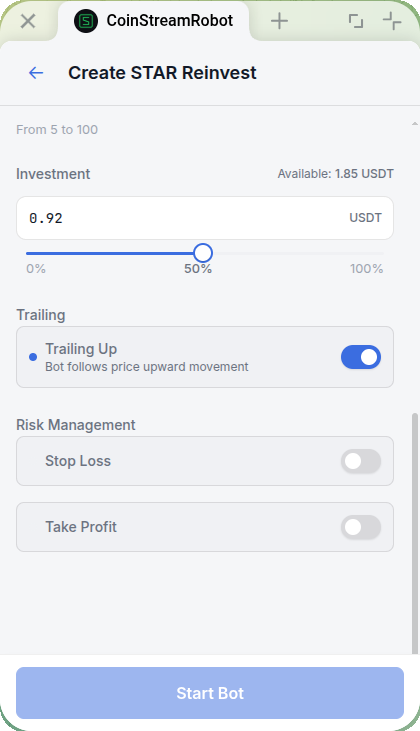
Stop Loss
Stop Loss protects against deep drawdowns. If price drops to the SL level, the bot sells everything and shuts down.
Settings:
- Quick picks: -5%, -10%, -15%, -20% from lower price
- Manual price input for precise control
Trailing Stop Loss is also available — the SL moves up as price rises, locking in gains as the bot profits.
When Trailing Up is active, the Stop Loss moves up together with the grid. As the grid shifts to higher prices, the SL follows — protecting gains without manual adjustment.
Without Stop Loss, a warning appears: "Stop Loss not set — unlimited risk." Always set SL at least -15%.
Take Profit
Take Profit locks in gains. When the bot reaches the target, it sells everything and stops.
Two modes:
- PNL % — percentage of investment. Presets: +5%, +10%, +15%, +20%
- Price — specific price target. This mode is unique to STAR Reinvest — STAR Grid does not support TP by price
For STAR Reinvest, consider whether Take Profit aligns with your compounding goal. If you want long-term growth, leaving TP off may be appropriate. For shorter setups, TP helps lock in gains automatically.
Recommended Strategies
Conservative Compounder
| Parameter | Value |
|---|---|
| Range | ±15-20% from current price |
| Levels | 10-15 |
| Step | 1.5-2% |
| Stop Loss | -15% |
| Take Profit | off |
Best for: long-term compounding with low maintenance. Wide range minimizes the risk of price escaping the grid. Without Take Profit, the bot compounds indefinitely.
Balanced Growth
| Parameter | Value |
|---|---|
| Range | ±10-15% from current price |
| Levels | 25-40 |
| Step | 1% |
| Stop Loss | -15% |
| Take Profit | +20% |
Best for: medium-term setups where you want compounding but also want automatic exit. More levels mean more frequent trades and faster compounding.
Aggressive Reinvestor
| Parameter | Value |
|---|---|
| Range | ±5-8% from current price |
| Levels | 50-100 |
| Step | 0.5% |
| Stop Loss | -10% |
| Take Profit | +10% |
Best for: active markets with strong volatility. Lots of small trades that compound quickly. Tight range means price can break out easily — requires monitoring.
With aggressive settings, compounding amplifies both gains and losses. Increasing position size means deeper drawdowns if the market turns. Always set Stop Loss.
Configuration Example: ETH/USDT
| Parameter | Value |
|---|---|
| Pair | ETH/USDT |
| Investment | 500 USDT |
| Grid Levels | 15 |
| Price Range | 1,900 — 2,100 USDT |
| Grid Step | 0.7% |
| Order Size | ~33 USDT (initial) |
| Stop Loss | -15% |
| Take Profit | off |
How Compounding Works
After each completed buy-sell cycle, the realized profit goes back into the grid. Over time:
| Week | Effective Investment | Order Size |
|---|---|---|
| 1 | 500 USDT | ~33 USDT |
| 4 | ~520 USDT | ~35 USDT |
| 8 | ~545 USDT | ~36 USDT |
| 12 | ~570 USDT | ~38 USDT |
These numbers depend on volatility and trade frequency. Higher volatility generates more trades, which compounds faster.
Understanding the Numbers
Realized profit shows actual money from completed trades — this is the key metric.
Unrealized profit may be negative if price is below the average purchase price. This is normal for grid bots — when price bounces back, those positions sell for profit.
With STAR Reinvest, realized profits feed back into position sizes. This means the "Realized Profit" metric may appear lower than expected because profits are immediately working in the grid rather than sitting idle.
Tracking Reinvested Profits
The bot details screen shows two dedicated metrics for reinvested profits:
- Reinvested Profit (%) — how much the bot has reinvested relative to the initial investment. For example, 12% means the grid is now working with 12% more capital than you originally put in
- Reinvested Profit (USDT) — the absolute amount of profit currently working inside the grid
These metrics help you gauge the compounding effect over time and decide whether to let the bot keep running or take profits.
FAQ
How is STAR Reinvest different from STAR Grid?
The core grid mechanics are identical. The difference is profit handling: STAR Grid accumulates profits separately, while STAR Reinvest feeds them back into the grid. Both bots support Trailing Up.
Does compounding really make a difference?
Over short periods (days), the effect is minimal. Over weeks and months, compounding creates a noticeable gap. The exact impact depends on market volatility — more trades mean faster compounding.
What's the minimum to start?
Same as STAR Grid. For ETH/USDT, 100 USDT is comfortable. Cheaper altcoins work with 50 USDT. More capital enables more grid levels and faster compounding.
Can I switch between STAR Reinvest and STAR Grid?
Not on a running bot. Stop the current bot and create a new one with the desired type. Your investment will be returned to your balance.
What happens if price leaves the range?
If price goes up: the bot sold all coins and waits with USDT. No compounding occurs while idle.
If price goes down: the bot bought at every level and paused. You hold the coins in drawdown. Wait for recovery or cut losses.
What are the fees?
You pay the exchange's trading fee on each trade. Coinstream does not charge any additional fees.
STAR Reinvest bots compound profits from volatility 24/7. The key rule: start small, always set a Stop Loss, and let compounding work over time.
Ready to start? Launch your first bot in 5 minutes.