Demo Mode
Demo mode gives you a full trading environment with 50,000 USDT in virtual funds. Every feature works exactly like real mode — bots, manual trades, alerts, live charts. The only difference is none of the money is real.
It's useful for:
- Beginners — learn the platform without risking anything
- Experienced traders — test a new strategy or bot configuration before going live
- Everyone — explore freely, no pressure
No API keys required. No time limit. Start immediately.
How to Enable Demo
- Open the app via @coinstream_robot
- Tap the dropdown menu at the top of the screen (shows Spot by default)
- Select Spot Demo
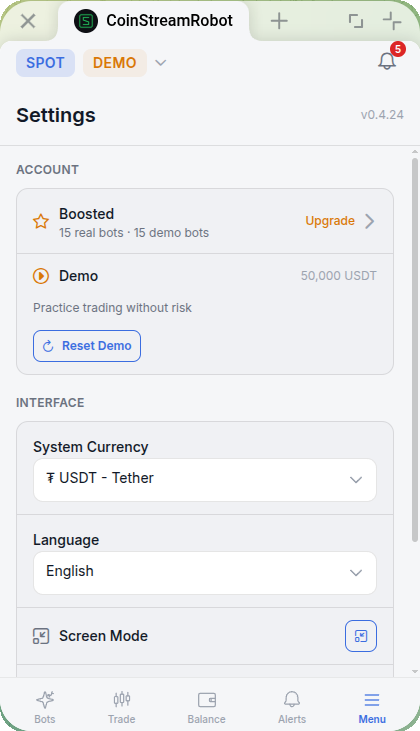
Switching is instant. Real and demo environments are fully isolated — data, balances, and bots don't cross over.
Bots running in the other mode keep going in the background when you switch. Nothing stops or resets.
What's Available in Demo
| Feature | Description |
|---|---|
| Manual trading (spot) | Buy and sell with your virtual balance |
| STAR Grid bot | Grid trading automation — details |
| STAR Reinvest bot | Grid trading with reinvestment — details |
| Price alerts | Create and receive notifications — details |
| Charts & market data | Real prices, real time |
Prices are real — bots execute against live market data. Demo results closely mirror what you'd see in real trading.
Bot settings in demo are identical to real mode. Stats are calculated the same way: realized and unrealized profit, trade count, APR.
Demo Balance
- Starting balance: 50,000 USDT (virtual)
- Completely isolated from your real balance
- Reset available in Settings (Account section) → "Reset Demo" button — returns balance to 50,000 USDT and stops all demo bots
Ran your demo balance down testing an aggressive strategy? Reset it and start fresh. That's exactly what it's for.
Limitations
Demo simulates trading accurately, but it's not identical to live execution:
- Orders are not placed on the exchange — everything is simulated internally
- No slippage — demo fills happen at the exact expected price
- No partial fills — large orders execute instantly and in full
- No market impact — big orders don't move prices the way they would on a real exchange
- API keys not required — no exchange connection needed
- No withdrawals — virtual funds stay virtual
Demo uses real market prices, so your results will be close to real trading — but not identical due to simulated execution.
Moving to Real Trading
When you're ready to trade with real funds:
- Tap the mode dropdown at the top of the screen and switch back to Spot
- Connect your exchange (AsterDEX)
- Start with a small amount to get comfortable with live execution
Real trading means real money. Start small and always set Stop Loss on your bots.
FAQ
Can I run demo and real bots at the same time?
Yes. Demo and Real are fully independent. You can have bots running in both modes simultaneously. Switching the toggle only changes what you're viewing — it doesn't pause or stop anything in the other mode.
Does demo use real prices?
Yes. All market data — prices, charts, real-time updates — is identical to real mode. Only the order execution is simulated.
Can I reset the demo balance?
Yes. Go to Settings (Account section) → "Reset Demo". Your balance returns to 50,000 USDT and all demo bots are stopped.
Do demo bots keep running when I switch to Real?
Yes. Both modes run in parallel independently. Switch back to Demo at any time to check your bots and their updated stats.
Demo mode is the best way to explore the platform risk-free. Open @coinstream_robot and try it now.