Price Alerts
Price alerts notify you the moment a cryptocurrency hits your target. They run 24/7 in the background — no need to keep the app open. When an alert triggers, you get a Telegram message instantly.
Whether you're waiting for a dip to buy, watching a breakout, or tracking a take-profit level, alerts keep you in the loop without staring at charts all day.
Getting Started
Alerts live inside the Telegram mini app. Open @coinstream_robot, tap Open, and navigate to the Alerts tab.
- Tap Create Alert
- Pick a trading pair from the list (sorted by 24h volume)
- Configure the alert type, target price, and notification settings
- Tap Create Alert to confirm
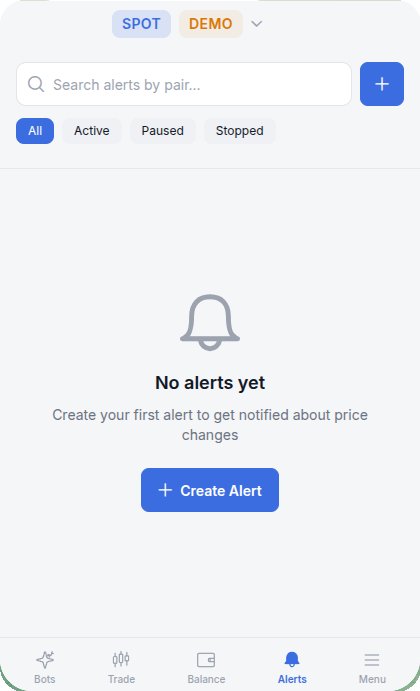
That's it — the alert is live. You'll receive a Telegram notification when the condition is met.
Alert Types
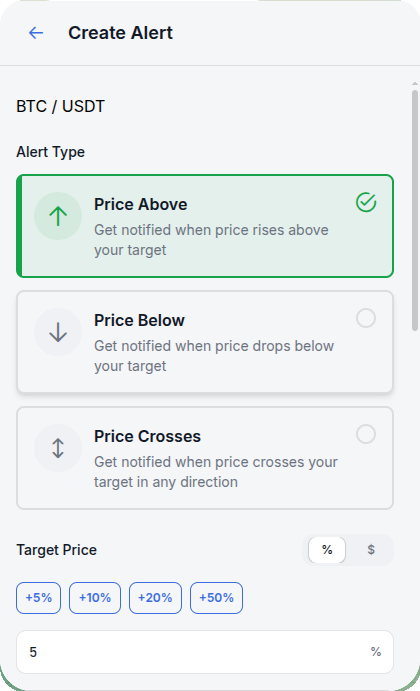
Three trigger conditions are available. Each one fires under different circumstances, so pick the one that matches your intent.
Price Above
Triggers when the price rises above your target. Use this when you're watching for a breakout, tracking resistance levels, or want to know when an asset reaches a certain price before selling.
Example: you hold ETH and want to sell if it breaks $2,200. Set a Price Above alert at $2,200 and wait.
Price Below
Triggers when the price drops below your target. Ideal for catching dips, monitoring support levels, or getting a heads-up before a potential breakdown.
Example: you want to buy BTC on a pullback to $65,000. Set a Price Below alert and you'll know the moment it gets there.
Price Crosses
Triggers when the price crosses your target in either direction — up or down. This is the most flexible option and works well for volatile assets where you want to react to any significant move around a key level.
Example: SOL is consolidating around $140. Set a Price Crosses alert at $140 to catch any decisive move away from that zone.
| Type | Triggers when | Best for |
|---|---|---|
| Price Above | Price rises above target | Breakouts, take-profit levels |
| Price Below | Price drops below target | Dip buying, support monitoring |
| Price Crosses | Price crosses target in either direction | Volatility tracking, key levels |
Setting a Target Price
After selecting the alert type, set the target price. Two input modes are available:
Percentage mode (%) — set the target as a percentage change from the current price. Quick buttons let you pick common values: +5%, +10%, +20%, +50%. Tap any of them and the target updates instantly.
Dollar mode ($) — enter an exact price manually. Useful when you have a specific level in mind, like a round number or a support/resistance line from your analysis.
Percentage mode is great for quick setups. Dollar mode gives you precision. Switch between them freely — the target recalculates automatically.
The info panel below the input shows three values at a glance:
| Field | What it shows |
|---|---|
| Current Price | Live market price of the pair |
| Target Price | The price that will trigger the alert |
| Change | Difference between current and target — in both % and $ |
The chart section is collapsible. Expand it to visually confirm where your target sits relative to recent price action.
Notification Settings
Repeat Notifications
By default, an alert fires once and stops. If you want to be notified multiple times (for example, when price keeps bouncing around a level), increase the repeat count using the + and − buttons.
The footer updates to reflect your choice: "Alert will automatically stop after X notifications or when you manually disable it."
Notification Interval
When repeat is set to more than 1, the Notification interval dropdown controls how much time passes between repeated notifications. The default is 30 minutes.
This prevents alert spam — you won't get 50 messages in a row if price hovers right at your target.
Even with repeats enabled, the alert stops once it hits the repeat limit. If you need indefinite monitoring, pause and re-enable the alert periodically.
Creating an Alert — Step by Step
Here's a concrete example. Let's say BTC is trading at $71,405 and you want to know when it hits $74,975.
- Go to Alerts → Create Alert
- Search for BTC/USDT and select it
- Choose Price Above
- Switch to % mode and tap +5% — the target updates to approximately 74,975 USDT
- Check the info panel: Current Price, Target Price, and the Change in both % and $
- Leave Repeat at 1× and Interval at 30 minutes
- Review the summary: "You'll be notified when BTC/USDT goes above 74,975.5"
- Tap Create Alert
Done. When BTC crosses $74,975, you'll get a Telegram message like this:
🚨 ALERT TRIGGERED BTC/USDT is now above 74,975.5 USDT Current price: 75,012.3 USDT
Managing Alerts
All your alerts appear on the Alerts tab. Use the filter tabs to quickly find what you need:
| Tab | Shows |
|---|---|
| All | Every alert you've created |
| Active | Currently monitoring the market |
| Paused | Temporarily disabled — can be resumed |
| Stopped | Triggered and finished, or manually stopped |
Search — type a pair name (e.g., "ETH") to filter the list when you have many alerts.
Actions on each alert:
- Pause — temporarily disable without deleting. The alert keeps its settings and can be resumed anytime.
- Resume — reactivate a paused alert. It starts monitoring again from the current price.
- Delete — permanently remove the alert.
Pausing is useful during high-volatility events (like major news) when you don't want noise from alerts near the current price.
Practical Examples
DCA Entry Points
You're dollar-cost averaging into ETH. Instead of checking the price every day, set a Price Below alert at each level you want to buy:
- ETH drops below $1,800 — first buy
- ETH drops below $1,600 — second buy
- ETH drops below $1,400 — third buy
Each alert fires once and notifies you to place the order. Combine with a STAR Grid bot for fully automated entries within a range.
Take Profit Monitoring
You bought SOL at $120 and want to take profit at $150. Set a Price Above alert at $150 with 1 repeat. When it triggers, open the app and execute the trade.
For a gradual exit, create multiple alerts: $140, $150, $160 — and sell portions at each level.
Volatility Breakout
BTC has been trading between $68,000 and $72,000 for two weeks. You expect a breakout but don't know which direction.
Set two Price Crosses alerts:
- One at $72,500 (above resistance)
- One at $67,500 (below support)
Whichever fires first tells you the breakout direction. React accordingly — or let a STAR Grid bot handle the volatility automatically.
Stablecoin De-peg Warning
If you hold stablecoins and want early warning of a de-peg event, set a Price Below alert on USDC/USDT at $0.995. A trigger means something unusual is happening and you should investigate immediately.
FAQ
How many alerts can I have at the same time?
There's no hard limit for most users. Create as many as you need across different pairs and markets.
Do alerts work on both Spot and Futures markets?
Yes. When creating an alert, you select the pair from your active market. Alerts are available for any pair listed on the platform.
What happens when an alert triggers?
You receive a Telegram message with the pair name, current price, and your target. The alert then either stops (if repeats are exhausted) or waits for the next interval before checking again.
Can I set alerts for multiple pairs at once?
Each alert covers one pair. To monitor several pairs, create a separate alert for each. It takes about 10 seconds per alert.
Do alerts expire?
Active alerts run indefinitely until they trigger or you stop them manually. Paused alerts stay paused until you resume or delete them. Nothing expires on its own.
Can I use alerts together with trading bots?
Absolutely. A common workflow: set a Price Below alert to know when a pair enters your target zone, then launch a STAR Grid bot to trade the range automatically. Alerts handle awareness, bots handle execution.
Price alerts are one of the simplest tools on the platform, but they make a real difference. Set them up once, and the market watches itself.
Ready to try? Open the app and create your first alert in under a minute.