How to Connect API Keys
To trade with bots, Coinstream needs access to your AsterDEX account via Pro API keys. The keys let Coinstream place orders on your behalf — without access to withdrawals or account settings.
The whole process takes about 3 minutes.
What You Need
- An account on AsterDEX with a connected wallet (MetaMask, WalletConnect, etc.)
- Some funds deposited on AsterDEX
Step 1: Find Your Wallet Address
Your wallet address is the one you used to sign up on AsterDEX.
- Open AsterDEX
- Look at the top right corner — your wallet address is displayed there (e.g.
0xb6...488c) - Click the copy icon next to the address
- Save it — you'll need it in Step 3
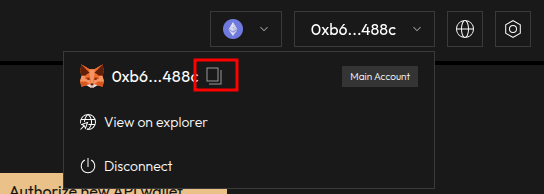
This is your main wallet address (MetaMask, WalletConnect, etc.) — not the API wallet address you'll generate next.
Step 2: Create a Pro API Key
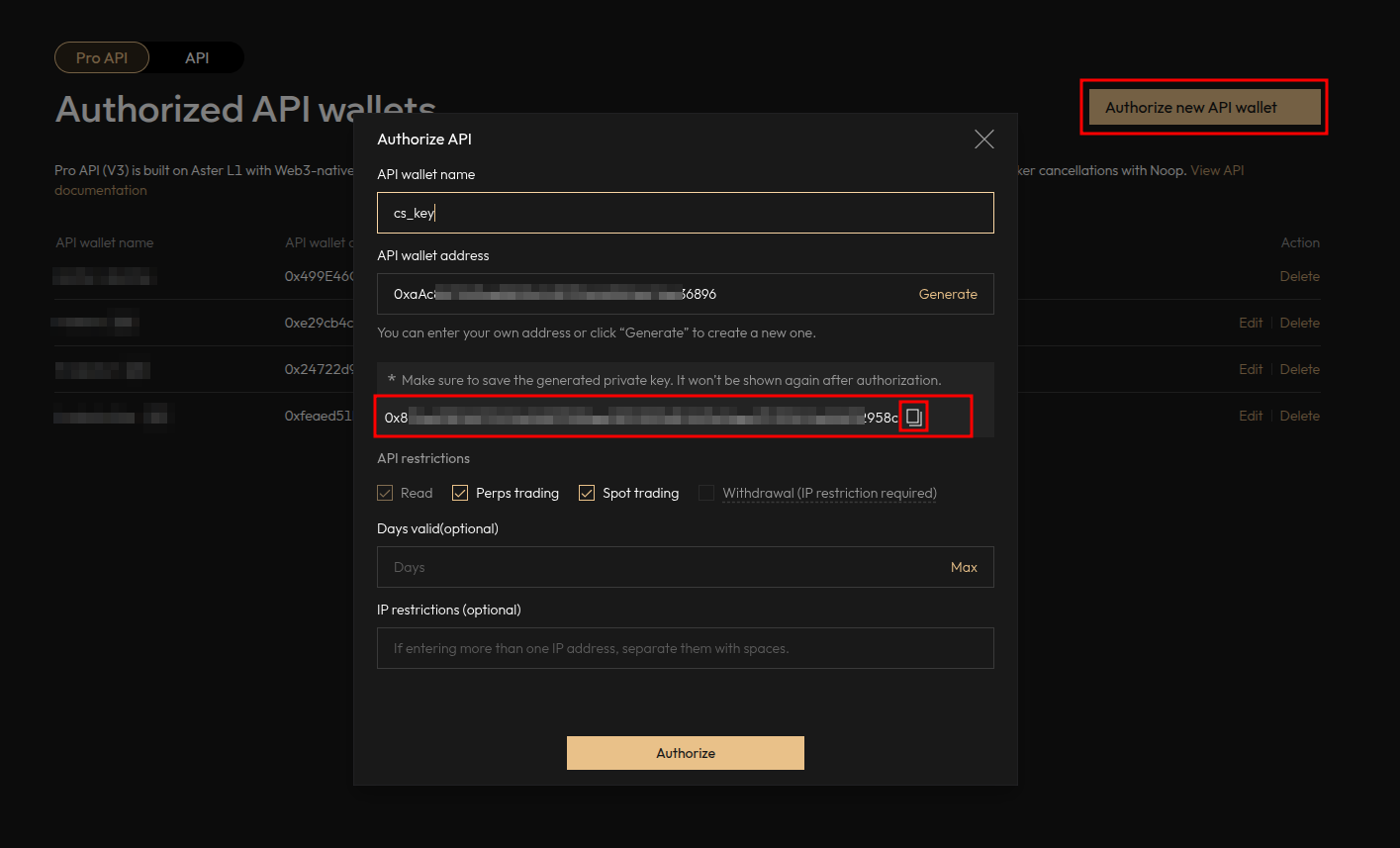
- On AsterDEX, go to the Pro API tab
- Click "Authorize new API wallet"
- Fill in the form:
- API wallet name — any name you like (e.g.
coinstream) - API wallet address — click "Generate" to create a new one automatically
- API wallet name — any name you like (e.g.
- Set API restrictions:
- Enable Read — required
- Enable Spot trading — if you plan to use spot bots
- Enable Perps trading — if you plan to use futures bots
Do NOT enable Withdrawal permission. It is not needed for trading bots and reduces security.
- Days valid — click "Max"
- Click "Authorize"
After authorization, the private key will appear on screen (starts with 0x).
Save the private key immediately — it is shown only once! If you lose it, you'll need to create a new API key from scratch.
Step 3: Add Keys to Coinstream
- Open @cs_insiderbot and launch the mini app
- Go to Settings
- Tap "Add API Key"
- Enter:
- Wallet Address — your main wallet address from Step 1
- Private Key — the Pro API private key from Step 2
- Tap "Connect Key"
The system validates your keys and connects them. Once connected, you can start creating bots right away.
API Permissions
| Permission | Required | Description |
|---|---|---|
| Read | Yes — always | View balances, positions, and order history |
| Spot trading | For spot bots | Place and cancel spot orders |
| Perps trading | For futures bots | Place and cancel futures orders |
| Withdrawal | No — never enable | Not needed for bots, only increases risk |
Enable both Spot and Perps trading on a single key. Coinstream works with one key only — do not create separate keys for spot and futures.
Troubleshooting
| Problem | Solution |
|---|---|
| "Invalid key" error | Make sure you copied the full key including the 0x prefix |
| Key expired | Create a new API key on AsterDEX (repeat Step 2) |
| Insufficient permissions | Check that Read + Spot/Perps trading are enabled in API restrictions |
| Can't find wallet address | Open AsterDEX, look at the top right corner — click the wallet icon |
| Connection fails | Verify you're pasting the main wallet address (Step 1), not the API wallet address |
Security
- Your keys are encrypted during transmission and storage
- We never store your private key in plain text
- Withdrawal permission is not required — don't enable it
- You can revoke any API key at any time on AsterDEX (Pro API tab → Delete)
Treat your Pro API private key like a password. Don't share it with anyone or paste it into unknown services.
FAQ
How many keys can I connect?
One. Coinstream works with a single API key. Make sure it has all necessary permissions (Read, Spot trading, Perps trading).
How do I delete or revoke a key?
On AsterDEX: go to the Pro API tab, find the key, and click Delete. In Coinstream: go to Settings and remove the key from your connected keys list.
What if my key expires?
If you set a validity period and it runs out, the bots using that key will stop executing trades. Create a new key (Step 2) and reconnect it in Coinstream (Step 3).
Do I need separate keys for spot and futures?
No. Use a single key with both Spot and Perps trading permissions. Coinstream supports only one connected key.
Is it safe to share my wallet address?
Your wallet address is public by design — it's visible on the blockchain. Sharing it poses no security risk. Never share your private key though.
Keys connected? Create your first trading bot — it takes under 5 minutes.
Need help configuring a bot? Check the Grid Spot Bot guide.